Control windows service
Article source code address: https://www.github.com/snowlyg/learns
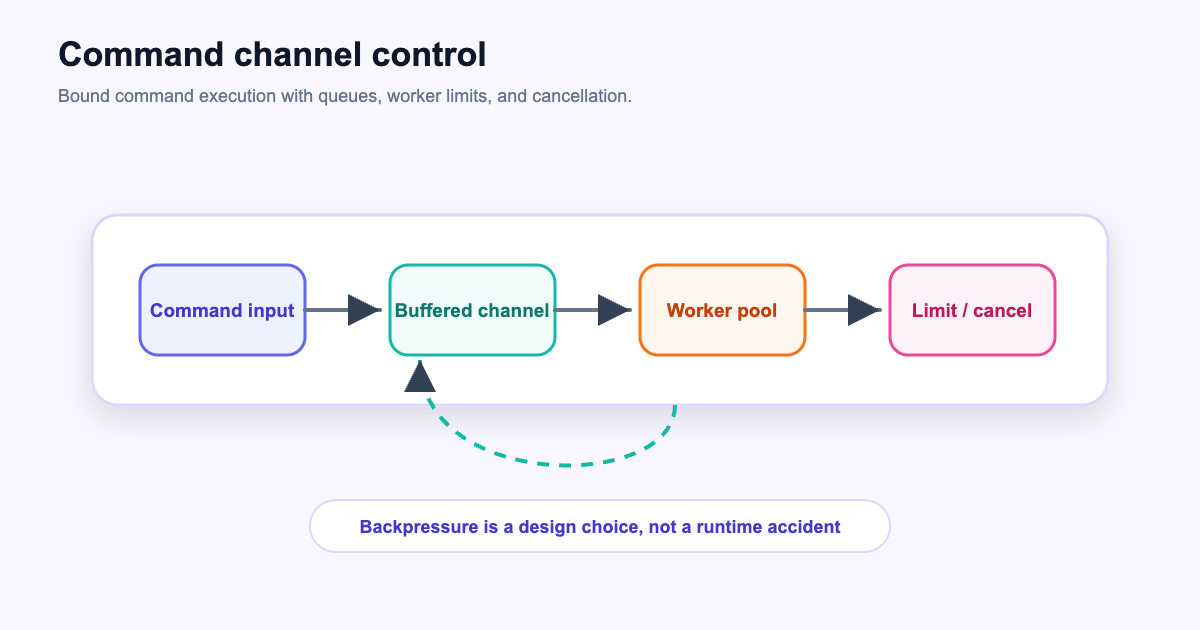
This article will introduce how to remotely control services, through a heartbeat mechanism, to detect whether a service needs to be updated, stopped, started and other operations at regular intervals.
Then use the obtained information and instructions to control the service.
The general idea is to achieve it through concurrency and channel features. Concurrency and channels are very important features of go, and it is necessary to learn how to use them.
Start a simple coroutine
It is easy to start a coroutine using the go keyword.
This coroutine prints the current time every 5 seconds
package main

import (
	"time"
)

func hearbeat() {
	for {
		println(time.Now().Format(time.RFC3339))
		time.Sleep(time.Second * 5)
	}
}

func main() {
	go hearbeat()
	// 防止主进程退出
	select {}
}
Create a new channel with a capacity of 1 and send an operation command to the channel every 5 seconds
package main

import (
	"time"
)
// actionChan 容量为 1 的通道,在 hearbeat , do 两个协程中传递指令信息
// 容量为 1 可以控制并发的数量,只有等发送的指令被处理后才能发送另一个指令
var actionChan = make(chan string, 1)

func hearbeat() {
	for {
		// TODO: 这里需要做处理写死了 update,正常这里需要请求某个接口返回得到一个操作指令
		action := "update"
		actionChan <- action
		// 休眠 5 秒
		println(time.Now().Format(time.RFC3339))
		time.Sleep(time.Second * 5)
	}
}

func main() {
	go hearbeat()
	// 防止主进程退出
	select {}
}
The channel capacity is 1, if the instruction is not processed after sending an instruction.
Otherwise, no more commands will be sent to the channel, and hearbeat will be blocked until the command is processed before the channel can accept new commands again.
Create a new coroutine to accept instructions and perform corresponding operations.
package main

import (
	"fmt"
	"time"

	"github.com/snowlyg/learns/advance/windows"
)

// actionChan 容量为 1 的通道,在 hearbeat , do 两个协程中传递指令信息
// 容量为 1 可以控制并发的数量,只有等发送的指令被处理后才能发送另一个指令
var actionChan = make(chan string, 1)

// hearbeat 每隔 5 秒返回一个操作
func hearbeat() {
	for {
		// TODO: 这里需要做处理写死了 update,正常这里需要请求某个接口返回得到一个操作指令
		action := "update"
		actionChan <- action
		// 休眠 5 秒
		println(time.Now().Format(time.RFC3339))
		time.Sleep(time.Second * 5)
	}
}

// 执行操作,从通道 actionChan 获取对应指令并执行对应操作
func do() {
	for {
		switch <-actionChan {
		case "start":
			err := windows.ServiceStart("myservice")
			if err != nil {
				fmt.Printf("start myservice %v", err)
			}
			println("start")
		case "stop":
			err := windows.ServiceStop("myservice")
			if err != nil {
				fmt.Printf("stop myservice %v", err)
			}
			println("stop")
		case "install":
			err := windows.ServiceInstall("myservice", "../cmd/myservice.exe", "myservice")
			if err != nil {
				fmt.Printf("install myservice %v", err)
			}
			println("install")
		case "uninstall":
			err := windows.ServiceUninstall("myservice")
			if err != nil {
				fmt.Printf("uninstall myservice %v", err)
			}
			println("uninstall")
		case "update":
			err := windows.ServiceStop("myservice")
			if err != nil {
				fmt.Printf("stop myservice %v", err)
			}
			err = windows.ServiceUninstall("myservice")
			if err != nil {
				fmt.Printf("uninstall myservice %v", err)
			}
			err = windows.ServiceInstall("myservice", "myservice.exe", "myservice")
			if err != nil {
				fmt.Printf("install myservice %v", err)
			}
			println("update")
		default:
			println("unknow action")
		}
	}
}

func main() {
	// 启动一个心跳协程,每隔5秒发送指令
	go hearbeat()
	// 启动一个执行命令协程,并等待心跳协程发送指令
	go do()

	// 防止主进程退出
	select {}
}
The new do coroutine fetches instructions from the channel and executes the corresponding instructions.
The two methods hearbeat and do in this program will not be executed in the original execution sequence.
After adding the modification of go keyword, they are both executing at the same time, one sends data to the channel actionChan,
One takes data from channel actionChan.
Through this program, we can remotely control one or more services. This is very useful when we need to remotely update or control service programs on multiple servers. You only need to perform operations locally instead of logging into remote servers one by one.