
Preface
- Building a development environment is an essential skill for a developer, but repeatedly building various development environments is still a boring and time-consuming task.
- Previous solutions were usually virtual machines or some integrated tools, which can well solve the problem of repeatedly building the same development environment.
- At the same time, they also have some shortcomings, such as the virtual machine is too bulky and the integrated tool functions are relatively fixed and single.
- The emergence of virtual container technologies such as docker has made it possible to build a variety of development environments.
Basic requirements
- Install docker
- Install docker-compose
- windows environment: requires win10 + wsl subsystem, refer to WSL configuration laravel development environment guide for WIN10 system#
The first step is to clone the docker-compose script and copy the configuration file
# 克隆脚本
git clone https://github.com/snowlyg/dnmp
#复制配置文件
copy docker-compose.sample.yml docker-compose.yml
According to the services you need, modify the configuration file to unlock or add the corresponding comment code
- PHP basic development environment nginx + mysql + redis is as follows
version: "3"
services:
  nginx:
    build:
      context: ./services/nginx
      args:
        NGINX_VERSION: 1.15.7-alpine
        CONTAINER_PACKAGE_URL: mirrors.aliyun.com
        NGINX_INSTALL_APPS: ""
    container_name: nginx
    ports:
      - "80:80"
      - "443:443"
    volumes:
      - ./www:/www/:rw
      - ./services/nginx/ssl:/ssl:rw
      - ./services/nginx/conf.d:/etc/nginx/conf.d/:rw
      - ./services/nginx/nginx.conf:/etc/nginx/nginx.conf:ro
      - ./services/nginx/fastcgi-php.conf:/etc/nginx/fastcgi-php.conf:ro
      - ./services/nginx/fastcgi_params:/etc/nginx/fastcgi_params:ro
      - ./logs/nginx:/var/log/nginx/:rw
    environment:
      TZ: "Asia/Shanghai"
    restart: always
    networks:
      - default

  php:
    build:
      context: ./services/php
      args:
        PHP_VERSION: php:7.3-fpm-alpine
        CONTAINER_PACKAGE_URL: mirrors.aliyun.com
        PHP_EXTENSIONS: "pdo_mysql,mysqli,mbstring,gd,curl,opcache,soap,amqp,bcmath,pcntl,redis,xdebug"
        TZ: "Asia/Shanghai"
    container_name: php
    expose:
      - 9501
    extra_hosts:
      - "www.site1.com:172.17.0.1"
    volumes:
      - ./www:/www/:rw
      - ./services/php/php.ini:/usr/local/etc/php/php.ini:ro
      - ./services/php/php-fpm.conf:/usr/local/etc/php-fpm.d/www.conf:rw
      - ./logs/php:/var/log/php
      - ./data/composer:/tmp/composer
    restart: always
    cap_add:
      - SYS_PTRACE
    networks:
      - default

#  php56:
#    build:
#      context: ./services/php
#      args:
#        PHP_VERSION: php:5.6.40-fpm-alpine
#        CONTAINER_PACKAGE_URL: mirrors.aliyun.com
#        PHP_EXTENSIONS: "pdo_mysql,mysqli,mbstring,gd,curl,opcache"
#        TZ: "Asia/Shanghai"
#    container_name: php56
#    expose:
#      - 9501
#    volumes:
#      - ./www:/www/:rw
#      - ./services/php/php.ini:/usr/local/etc/php/php.ini:ro
#      - ./services/php/php-fpm.conf:/usr/local/etc/php-fpm.d/www.conf:rw
#      - ./logs/php:/var/log/php
#      - ./data/composer:/tmp/composer
#    restart: always
#    cap_add:
#      - SYS_PTRACE
#    networks:
#      - default

  #  php54:
  #    build:
  #      context: ./services/php54
  #      args:
  #        PHP_VERSION: php:5.4.45-fpm
  #        CONTAINER_PACKAGE_URL: mirrors.aliyun.com
  #        PHP_EXTENSIONS: "pdo_mysql,mysqli,mbstring,gd,curl,opcache"
  #        TZ: "Asia/Shanghai"
  #    container_name: php54
  #    volumes:
  #      - ./www:/www/:rw
  #      - ./services/php54/php.ini:/usr/local/etc/php/php.ini:ro
  #      - ./services/php54/php-fpm.conf:/usr/local/etc/php-fpm.d/www.conf:rw
  #      - ./logs/php:/var/log/php
  #      - ./data/composer:/tmp/composer
  #    restart: always
  #    cap_add:
  #      - SYS_PTRACE
  #    networks:
  #      - default

  mysql:
   image: mysql:8.0.13
   container_name: mysql
   ports:
     - "3306:3306"
   volumes:
     - ./services/mysql/mysql.cnf:/etc/mysql/conf.d/mysql.cnf:ro
     - ./data/mysql:/var/lib/mysql/:rw
   restart: always
   networks:
     - default
   environment:
     MYSQL_ROOT_PASSWORD: "123456"
     TZ: "Asia/Shanghai"

  # mysql5:
  #   image: mysql:5.7.28
  #   container_name: mysql5
  #   ports:
  #     - "3305:3306"
  #   volumes:
  #     - ./services/mysql5/mysql.cnf:/etc/mysql/conf.d/mysql.cnf:ro
  #     - ./data/mysql5:/var/lib/mysql/:rw
  #   restart: always
  #   networks:
  #     - default
  #   environment:
  #     MYSQL_ROOT_PASSWORD: "123456"
  #     TZ: "Asia/Shanghai"

  #  openresty:
  #    image:  openresty/openresty:alpine
  #    container_name: openresty
  #    ports:
  #       - "80:80"
  #       - "443:443"
  #    volumes:
  #       - ./www:/www/:rw
  #       - ./services/openresty/conf.d:/etc/nginx/conf.d/:ro
  #       - ./services/openresty/openresty.conf:/ssl:rw
  #       - ./services/openresty/fastcgi-php.conf:/usr/local/openresty/nginx/conf/nginx.conf:ro
  #       - ./services/openresty/fastcgi_params:/usr/local/openresty/nginx/conf/fastcgi-php.conf:ro
  #       - ./services/openresty/ssl:/usr/local/openresty/nginx/conf/fastcgi_params:ro
  #       - ./logs/nginx:/var/log/nginx/:rw
  #    environment:
  #      TZ: "Asia/Shanghai"
  #    networks:
  #      - default

  redis:
    image: redis:5.0.3-alpine
    container_name: redis
    ports:
      - "6379:6379"
    volumes:
      - ./services/redis/redis.conf:/etc/redis.conf:ro
      - ./data/redis:/data/:rw
    restart: always
    entrypoint: ["redis-server", "/etc/redis.conf"]
    environment:
      TZ: "Asia/Shanghai"
    networks:
      - default

  #  memcached:
  #    image: memcached:alpine
  #    container_name: memcached
  #    ports:
  #      - "11211:11211"
  #    environment:
  #       MEMCACHED_CACHE_SIZE: "128"
  #    networks:
  #      - default

  # rabbitmq:
  #   image: rabbitmq:management
  #   container_name: rabbitmq
  #   restart: always
  #   ports:
  #     - "5672:5672"
  #     - "15672:15672"
  #   environment:
  #      TZ: "Asia/Shanghai"
  #      RABBITMQ_DEFAULT_USER: "myuser"
  #      RABBITMQ_DEFAULT_PASS: "mypass"
  #   networks:
  #         - default

  # phpmyadmin:
  #  image: phpmyadmin/phpmyadmin:latest
  #  container_name: phpmyadmin
  #  ports:
  #    - "8080:80"
  #  volumes:
  #    - ./services/phpmyadmin/config.user.inc.php:/etc/phpmyadmin/config.user.inc.php:ro
  #    - ./services/phpmyadmin/php-phpmyadmin.ini:/usr/local/etc/php/conf.d/php-phpmyadmin.ini:ro
  #  networks:
  #    - default
  #  environment:
  #    - PMA_HOST=mysql
  #    - PMA_PORT=3306
  #    - TZ=Asia/Shanghai

  # phpredisadmin:
  #  image: erikdubbelboer/phpredisadmin:latest
  #  container_name: phpredisadmin
  #  ports:
  #    - "${REDISMYADMIN_HOST_PORT}:80"
  #  networks:
  #    - default
  #  environment:
  #    - REDIS_1_HOST=redis
  #    - REDIS_1_PORT=6379
  #    - TZ=Asia/Shanghai

  # mongodb:
  #  image: mongo:4.1
  #  container_name: mongodb
  #  environment:
  #      MONGO_INITDB_ROOT_USERNAME: "root"
  #      MONGO_INITDB_ROOT_PASSWORD: "123456"
  #      TZ: "Asia/Shanghai"
  #  volumes:
  #    - ./data/mongo:/data/db:rw
  #    - ./data/mongo_key:/mongo:rw
  #  ports:
  #     - "27017:27017"
  #  networks:
  #     - default
  #  command:
  #     --auth

  #  adminmongo:
  #    image: mrvautin/adminmongo
  #    container_name: adminmongo
  #    ports:
  #      - "1234:1234"
  #    environment:
  #      - HOST=0.0.0.0
  #      - DB_HOST=mongodb
  #      - DB_PORT=27017
  #    networks:
  #      - default

  # elasticsearch:
  #  build:
  #    context: ./services/elasticsearch
  #    args:
  #      ELASTICSEARCH_VERSION: 7.1.1
  #      ELASTICSEARCH_PLUGINS: ""
  #  container_name: elasticsearch
  #  environment:
  #    - TZ=Asia/Shanghai
  #    - discovery.type=single-node
  #    - "ES_JAVA_OPTS=-Xms512m -Xmx512m"
  #  volumes:
  #    - ./data/esdata:/usr/share/elasticsearch/data
  #    - /services/elasticsearch/elasticsearch.yml:/usr/share/elasticsearch/elasticsearch.yml
  #  hostname: elasticsearch
  #  restart: always
  #  ports:
  #    - "9200:9200"
  #    - "9300:9300"

#  kibana:
#    image: kibana:7.1.1
#    container_name: kibana
#    environment:
#      TZ: "Asia/Shanghai"
#      elasticsearch.hosts: http://elasticsearch:9200
#      I18N_LOCALE: "zh-CN"
#    hostname: kibana
#    depends_on:
#      - elasticsearch
#    restart: always
#    ports:
#      - "5601:5601"

#  logstash:
#    image: logstash:7.1.1
#    container_name: logstash
#    hostname: logstash
#    restart: always
#    depends_on:
#      - elasticsearch
#    environment:
#      TZ: "Asia/Shanghai"
#    ports:
#      - "9600:9600"
#      - "5044:5044"


networks:
  default:
Execute the docker-compose command in the script root directory to build the environment
- If the corresponding services, such as apache, nginx, mysql, etc., are installed on this machine, the corresponding ports 80, 3306, etc. will be occupied.
- Need to modify the port mapping relationship items of the previous configuration
# 修改为,前面的端口是本机端口,后面的是容器内的端口。
# 这个设置表示将 本机端口映射到容器的80端口
# 后面访问的时候也需要使用 83 端口,比如 http://localhost:83s
ports:
- "83:80" - ,
  # 构建本启动脚本未注释部分的服务,并在守护对应服务
  docker-compose up -d
  # 如果只启动部分服务,比如 php
  docker-compose up -d php
  # 或者 php mysql
  docker-compose up -d php mysql
Check whether the corresponding service starts normally
Can be viewed directly on the panel
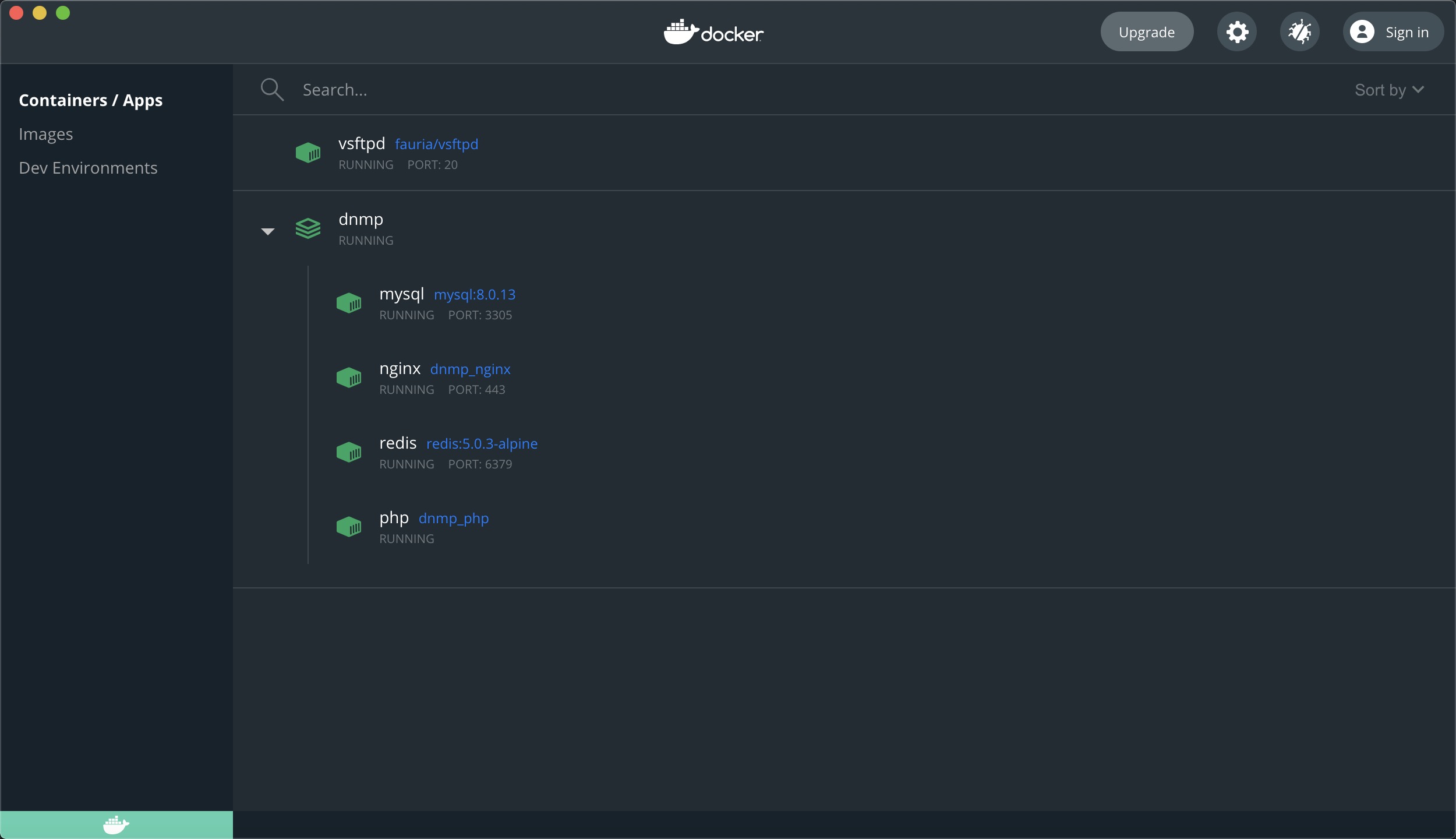
Or use the command line
docker psto view
You can see the name, status, creation time and corresponding port of the corresponding service
Deploy an application to the php environment built by this docker
#进入 nginx 配置目录
cd services/nginx/conf.d/
# 新建一个配置文件 loclhost.conf
server {
  listen 80;
  server_name localhost;
  root /www;

  #add_header X-Frame-Options "SAMEORIGIN";
  #add_header X-XSS-Protection "1; mode=block";
  #add_header X-Content-Type-Options "nosniff";

  index index.html index.htm index.php;

  charset utf-8;

  location / {
    #try_files $uri $uri/ /index.php?$query_string;
    if (!-e $request_filename) {
      rewrite  ^(.*)$  /index.php?s=/$1  last;
    }
  }

  location = /favicon.ico { access_log off; log_not_found off; }
  location = /robots.txt  { access_log off; log_not_found off; }

  error_page 404 /index.php;

  location ~ \.php$ {
    fastcgi_pass  php:9000;
    fastcgi_index index.php;
    fastcgi_param SCRIPT_FILENAME $realpath_root$fastcgi_script_name;
    include fastcgi_params;
  }

  location ~ /\.(?!well-known).* {
    deny all;
  }
}
# 注意 location ~\.php$ {} 里面, fastcgi_pass 的值是 php:9000 不是通常的 127.0.0.1,至于原理后面会提到

# 新建一个 index.html 文件到 www/ 目录下,再访问 http://localhost 就能看到 index.html 里面的内容了。
Easy to step on pitfalls
- When deploying a formal project, you cannot use regular localhost or 127.0.0.1 when configuring the service addresses of mysql and redis.
- Because php, mysql, redis, and nginx are all deployed in different docker containers that are relatively isolated, just like installing them on different machines.
- To access other containers in a container, you need to use their container names, which are also their network address aliases, such as mysql, php, etc.
- So when configuring nginx settings earlier, in location ~.php$ {}, the value of fastcgi_pass is php:9000, not the usual 127.0.0.1